Posts

Showing posts with the label Knowledge Base

Step by Step - How to turn on Password Protection for Oracle Database Listener Control (LSNRCTL) Command Line Utility
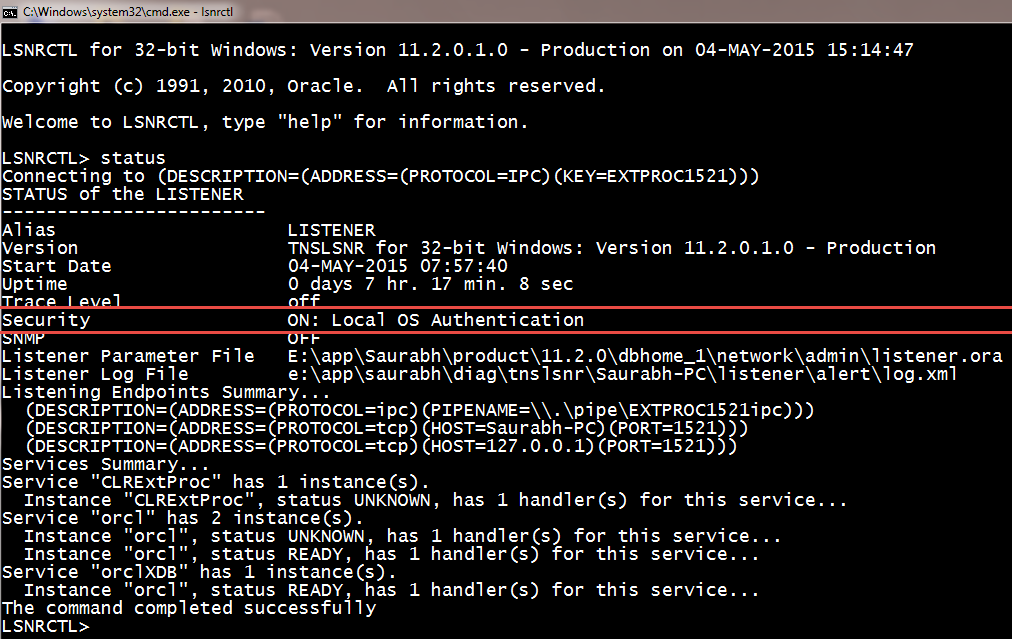
Image
Step 1:- open administrator cmd Step 2:- C:\lsnrctl Step 3:- lsnrctl> change_password Step 4:- lsnrctl> old password : (keep this blank) Step 5:- lsnrctl> new password : (set your password here) Step 6:- lsnrctl> retype new password : (retype your password here) Step 7:- lsnrctl> save_config  Step 8:- lsnrctl> exit Step 9:- Open listener.ora file from ORACLE_HOME\NETWORK\ADMIN\ Step 10:- Add this line - LOCAL_OS_AUTHENTICATION_LISTENER = OFF step 11:- lsnrctl> stop step 12:- lsnrctl> start <-- this is required to reload the listener.ora file step 13:- lsnrctl> exit Step 14:- from administrator cmd open lsnrctl Step 15:- lsnrctl>stop The above command will give an error like Connecting to (DESCRIPTION=(ADDRESS=(PROTOCOL=TCP)(HOST=B-3)(PORT=1521))) TNS-01169: The listener has not recognized the password Step 16:- LSNRCTL> set password unisoft <--- your password set above. Step 17:- lsnrctl> stop <-...

Oracle Database 11g New Feature - Backup-Based Duplication Without a Target Connection or Recovery Catalog Connection

Image
Oracle 11g New Feature - Duplicating a Oracle Database Using 11g RMAN Backup Location Option but Without Connection to Target or  Recovery Catalog We have Target Database name as ORCL And we are creating a duplicate database using RMAN Auxiliary Instance with name as AUXDB by using the backup location but without making connection to target database and recovery catalog database while the duplication process is running. Note :- This practical need same directory structures and it is performed on same server. Just the database name is different so we are converting the path with respect to dbname only.  Image Source - docs.oracle.com Your Target Database can be in any log mode. Take RMAN Backup based on your Database Log Mode. A) Archivelog Mode - Take a Whole Hot Backup C:\set ORACLE_SID=orcl C:\rman target / RMAN> backup database plus archivelog; B) Noarchivelog Mode - Take a Whole Cold Backup C:\set ORACLE_SID=orcl C:\rman targe...

Oracle Datafiles Are Not Exactly Unlimited In Size - OCA Admin 1 Topic

Image
Datafiles are not exactly unlimited in size Data files are not exactly unlimited in size, so the term "Unlimited" refers to the ceiling your datafile is able to reach, and it depends on the Oracle Block Size. To find the absolute maximum file size multiply block size by 4194303. This is the actual maximum size. You may want to read the Metalink Note:112011.1. A datafile cannot be oversized, otherwise it could get corrupted. Let's say if your database is 8k blocks that means that one file can not exceed approximately 34GB (34,359,730,176 bytes) without having database corruption. Sizing datafiles is a matter of manageability, it depends on your storage, the amount of space allocated in a single managed storage unit. 128G is the maximum datafile size in 10g, but considering the maximum number of datafiles a Database can have, it can make a database to potentially size 8E (exabytes = 8,388,608 T). The maximum data file size is calculated by: Maximum...