Posts

Showing posts with the label 10g

Dropping Oracle Database 11g Manually with Drop Database Statement

Image

Using Flashback Table with Flashback Version Query

Image

Performing RMAN Tablespace Point-in-Time Recovery (TSPITR)

Image
Purpose of RMAN TSPITR Recovery Manager (RMAN) TSPITR enables quick recovery of one or more tablespaces in a database to an earlier time without affecting the rest of the tablespaces and objects in the database. RMAN TSPITR is most useful for the following situations: To recover a logical database to a point different from the rest of the physical database, when multiple logical databases exist in separate tablespaces of one physical database. For example, you maintain logical databases in the orders and personnel tablespaces. An incorrect batch job or data manipulation language (DML) statement corrupts the data in only one tablespace. To recover data lost after data definition language (DDL) operations that change the structure of tables. You cannot use Flashback Table to rewind a table to before the point of a structural change such as a truncate table operation. To recover a table after it has been dropped with the PURGE option. To recover from the logi...

Step by Step - How to Create And Configure RMAN Recovery Catalog Database

Image
Purpose of the Recovery Catalog A recovery catalog is a database schema used by RMAN to store metadata about one or more Oracle databases. Typically, you store the catalog in a dedicated database. A recovery catalog provides the following benefits: A recovery catalog creates redundancy for the RMAN repository stored in the control file of each target database . The recovery catalog serves as a secondary metadata repository. If the target control file and all backups are lost, then the RMAN metadata still exists in the recovery catalog. A recovery catalog centralizes metadata for all your target databases. Storing the metadata in a single place makes reporting and administration tasks easier to perform. A recovery catalog can store metadata history much longer than the control file. This capability is useful if you must do a recovery that goes further back in time than the history in the control file. The added complexity of managing a recovery catal...

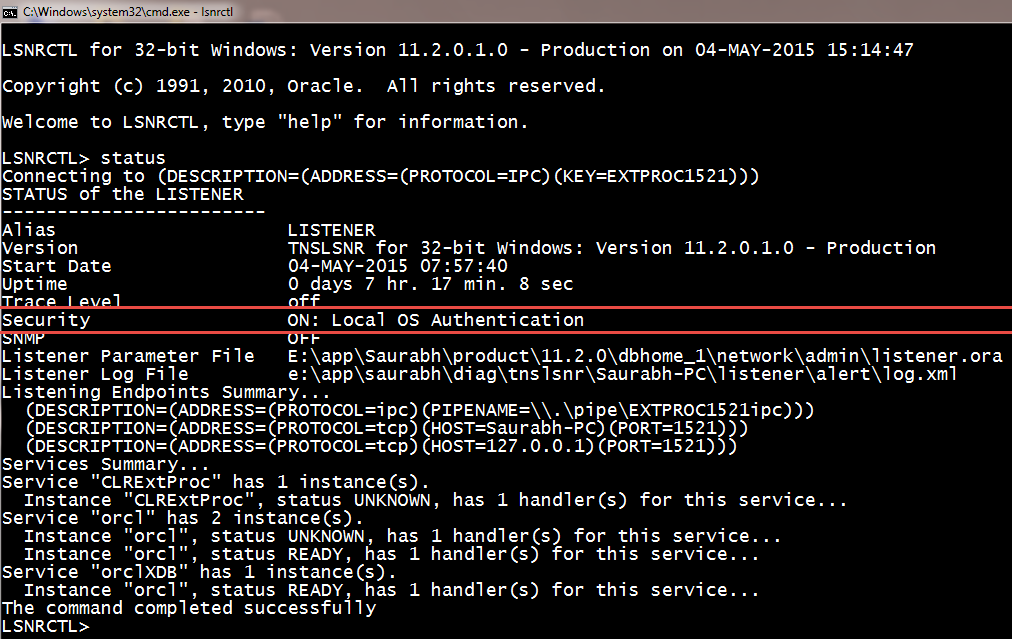
Step by Step - How to turn on Password Protection for Oracle Database Listener Control (LSNRCTL) Command Line Utility

Image
Step 1:- open administrator cmd Step 2:- C:\lsnrctl Step 3:- lsnrctl> change_password Step 4:- lsnrctl> old password : (keep this blank) Step 5:- lsnrctl> new password : (set your password here) Step 6:- lsnrctl> retype new password : (retype your password here) Step 7:- lsnrctl> save_config  Step 8:- lsnrctl> exit Step 9:- Open listener.ora file from ORACLE_HOME\NETWORK\ADMIN\ Step 10:- Add this line - LOCAL_OS_AUTHENTICATION_LISTENER = OFF step 11:- lsnrctl> stop step 12:- lsnrctl> start <-- this is required to reload the listener.ora file step 13:- lsnrctl> exit Step 14:- from administrator cmd open lsnrctl Step 15:- lsnrctl>stop The above command will give an error like Connecting to (DESCRIPTION=(ADDRESS=(PROTOCOL=TCP)(HOST=B-3)(PORT=1521))) TNS-01169: The listener has not recognized the password Step 16:- LSNRCTL> set password unisoft <--- your password set above. Step 17:- lsnrctl> stop <-...

Oracle 11g New Feature - Duplicating a Database Using 11g RMAN From Active Database Option without ANY BACKUP

Image
Oracle 11g New Feature - Duplicating a Database Using 11g RMAN From Active Database Option without ANY BACKUP We have Target Database name as ORCL And we are creating a Auxiliary database with name as AUXDB    Image Source - docs.oracle.com Check log_mode of Target Database. Target must be in archivelog mode. Otherwise put the database in archivelog mode. shutdown immediate startup mount alter database archivelog; alter database open; Create Pfile from Target Database Spfile C:\set ORACLE_SID=orcl C:\sqlplus / as sysdba SQL> create pfile='C:\app\Administrator\product\11.2.0\dbhome_1\database\initauxdb.ora' from spfile; Open pfile with notepad and replace (Ctrl + H) all orcl to auxdb except for parameter local_listener. SQL> host notepad C:\app\Administrator\product\11.2.0\dbhome_1\database\initauxdb.ora On Windows Platform You need to Create a new Instance for auxdb which also creates a password file for the same. SQL> hos...

Step By Step Creating Oracle Duplicate Database 10g on Same Server Using RMAN Auxiliary Instance and RMAN Backup

Image
Duplicating Target Database Using RMAN Auxiliary Instance on Oracle 10g                                                   or Creating Duplicate Database on the Same Server Using RMAN Backup. We have Target Database name as ORCL And we are creating a Auxiliary database with name as AUXDB  Fig :- Backup-Based Duplication with a Target Connection Image Source - docs.oracle.com 1.Take Whole Hot/Cold Backup of Target Database RMAN> backup database plus archivelog; 2.Create Pfile from Target Database Spfile SQL> create pfile='C:\ORACLE\PRODUCT\10.2.0\DB_1\Database\initauxdb.ora' from spfile; 3.Open pfile with notepad and replace (Ctrl + H) all orcl to auxdb SQL> host notepad C:\ORACLE\PRODUCT\10.2.0\...

Oracle Architecture - Explained In Detailed - Administration I

Image
Figures shown in these notes are from Oracle® Database Concepts 11 g Release 2 Objectives These notes introduce the Oracle server architecture.   The architecture includes physical components, memory components, processes, and logical structures. Primary Architecture Components The figure shown above details the Oracle architecture. Oracle server :   An Oracle server includes an Oracle Instance and an Oracle database .   ·         An Oracle database includes several different types of files:   datafiles, control files, redo log files and archive redo log files.   The Oracle server also accesses parameter files and password files.   ·         This set of files has several purposes.   o    One is to enable system users to process SQL statements.   o    Another is to improve system performance.   o    Still a...