Posts

Showing posts with the label Admin 1

Dropping Oracle Database 11g Manually with Drop Database Statement

Image

Step by Step - How to resolve redo log file corruption using ALTER DATABASE CLEAR UNARCHIVED LOGFILE command

Image
Connect to sys using sqlplus in admin command prompt Check whether your database is in archive log mode or not. Run command ARCHIVE LOG LIST. It will show you the following details: It is always preferable to have your database in archive log mode. The reason being if your database is in archive log mode you can recover from all committed changes in the event of an OS or disk failure. This query will display the path of redo log files, their group and their status. It is always recommended to have a minimum of two members in one group. As you can see I have only 1 member in group 6 whose current status is INACTIVE. I intentionally have 1 member to generate a scenario for the sake of this practical. Now go to the specified path where the redo log member of group 6 is located and open it in a notepad. It will show some symbolic data. Delete couple of lines and save it the original location which is the one we got as a result of query. Why did we do the above step i....

REMAP_DATA Parameter of Oracle Data Pump Export (expdp)/ Import (impdp) - New Feature Oracle Database 11g

Image
   REMAP_DATA Default: There is no default Purpose The REMAP_DATA parameter allows you to specify a remap function that takes as a source the original value of the designated column and returns a remapped value that will replace the original value in the dump file. A common use for this option is to mask data when moving from a production system to a test system. For example, a column of sensitive customer data such as credit card numbers could be replaced with numbers generated by a REMAP_DATA function. This would allow the data to retain its essential formatting and processing characteristics without exposing private data to unauthorized personnel. The same function can be applied to multiple columns being dumped. This is useful when you want to guarantee consistency in remapping both the child and parent column in a referential constraint. Syntax and Description REMAP_DATA=[ schema .] tablename . column_name :[ schema .] pkg . function The descri...

Step by Step - How to Create And Configure RMAN Recovery Catalog Database

Image
Purpose of the Recovery Catalog A recovery catalog is a database schema used by RMAN to store metadata about one or more Oracle databases. Typically, you store the catalog in a dedicated database. A recovery catalog provides the following benefits: A recovery catalog creates redundancy for the RMAN repository stored in the control file of each target database . The recovery catalog serves as a secondary metadata repository. If the target control file and all backups are lost, then the RMAN metadata still exists in the recovery catalog. A recovery catalog centralizes metadata for all your target databases. Storing the metadata in a single place makes reporting and administration tasks easier to perform. A recovery catalog can store metadata history much longer than the control file. This capability is useful if you must do a recovery that goes further back in time than the history in the control file. The added complexity of managing a recovery catal...

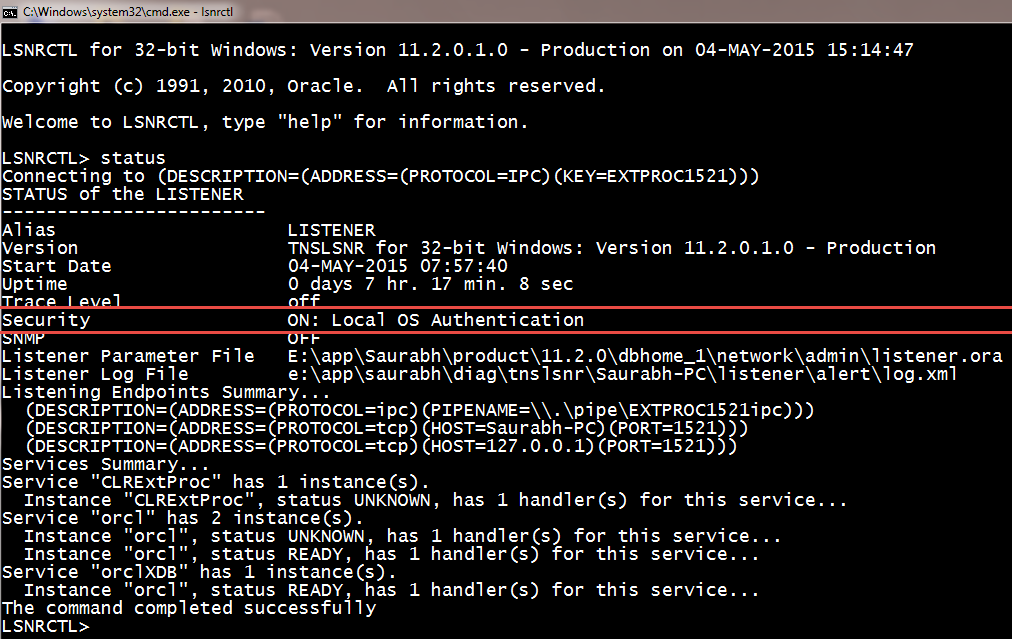
Step by Step - How to turn on Password Protection for Oracle Database Listener Control (LSNRCTL) Command Line Utility

Image
Step 1:- open administrator cmd Step 2:- C:\lsnrctl Step 3:- lsnrctl> change_password Step 4:- lsnrctl> old password : (keep this blank) Step 5:- lsnrctl> new password : (set your password here) Step 6:- lsnrctl> retype new password : (retype your password here) Step 7:- lsnrctl> save_config  Step 8:- lsnrctl> exit Step 9:- Open listener.ora file from ORACLE_HOME\NETWORK\ADMIN\ Step 10:- Add this line - LOCAL_OS_AUTHENTICATION_LISTENER = OFF step 11:- lsnrctl> stop step 12:- lsnrctl> start <-- this is required to reload the listener.ora file step 13:- lsnrctl> exit Step 14:- from administrator cmd open lsnrctl Step 15:- lsnrctl>stop The above command will give an error like Connecting to (DESCRIPTION=(ADDRESS=(PROTOCOL=TCP)(HOST=B-3)(PORT=1521))) TNS-01169: The listener has not recognized the password Step 16:- LSNRCTL> set password unisoft <--- your password set above. Step 17:- lsnrctl> stop <-...

Oracle Architecture - Explained In Detailed - Administration I

Image
Figures shown in these notes are from Oracle® Database Concepts 11 g Release 2 Objectives These notes introduce the Oracle server architecture.   The architecture includes physical components, memory components, processes, and logical structures. Primary Architecture Components The figure shown above details the Oracle architecture. Oracle server :   An Oracle server includes an Oracle Instance and an Oracle database .   ·         An Oracle database includes several different types of files:   datafiles, control files, redo log files and archive redo log files.   The Oracle server also accesses parameter files and password files.   ·         This set of files has several purposes.   o    One is to enable system users to process SQL statements.   o    Another is to improve system performance.   o    Still a...